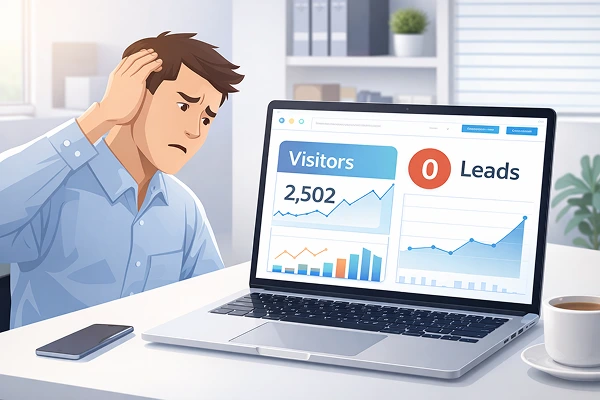
Many businesses invests heavy amount of money into creating beautiful websites. The design looks updated and professional with high quality images. But after 6 months of launching you notice there is no leads, no inquiries and very few customers.
This is a very common scenario for many small businesses and start-ups. If you are unable to find the issue why your website is not generating leads, the answer usually lies in strategy, user experience and conversion optimization, not just design.
A good website not only looks attractive but also focuses on user flow, trust signals and CTAs. If these elements are missing, even beautiful websites fail.
Let’s see the real reason why websites struggle to generate leads and how you can fix them.
Why website is not generating leads?
One of the misconception in web design is that good design automatically leads to conventions. In reality, design is only one part of a larger system that includes messaging, user experience, SEO and conversion strategy.
Below are the most common causes :
1. The website focuses on design instead of conversion
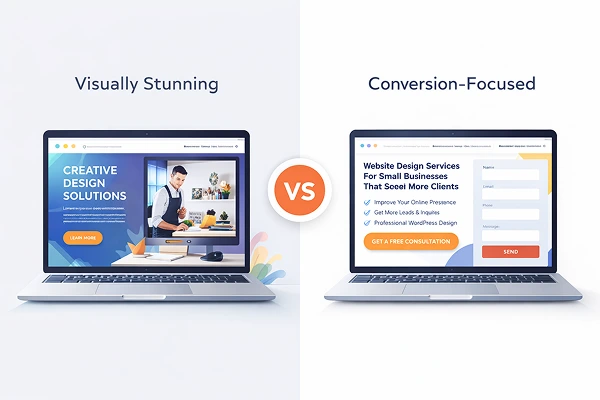
Many websites prioritize visuals instead of results and this creates a website design vs conversion problem.
A site might have beautiful animations, stylish layouts and impressive graphics but if visitors don’t clearly understand what the website is for and what they offer, visitors leave without taking action.
For example, consider a Landscaping company with a stunning website but without any ” Get A Quote” or ” Contact Us ” button. Visitors may admire the design but never become customers.
How to fix it :
- Add clear call-to-action buttons
- Place contact options in visible locations
- Guide visitors towards the next step
Design should support business goals, not distract visitors.
2. Unclear value proposition
Visitors decide within few seconds whether they want to stay or leave your website. If they cannot quickly understand what you offer, they leave.
For example, a home page headline like :
” Welcome to our website “
Doesn’t tell visitors anything about the website.
A better headline would be :
” Professional website design for small businesses that want more clients “
Clear messaging helps visitors understand what your business offer.
3. Website UX problems affecting conversions
User experience plays very important role in website success.
Common UX problems include :
- Difficult navigation
- Too many menu options
- Slow page loading
- Hard to read text
- Confusing layout
- Confusing layout
For example :
If someone visits a plumber’s website during an emergency. If the phone number is difficult to find, they will simply move to another website.
Good UX makes user flow smooth.
4. Website traffic but no leads
Visitors may come on the website through search engines, but if the site doesn’t take them towards a specific action, they leave without contacting the business.
Signs of this issue :
- Visitors spend little time on the site.
- Less number of form submissions.
- No enquiry despite decent traffic.
Solution :
Optimize your website for leads by including :
- Strong CTAs
- Lead capture forms
- Clear contact information
- Service focused landing pages
This process is called website optimization for leads.
5. Weak call-to-action
A call-to-action (CTA) tells visitors what they should do next.
Without strong and clear CTAs, users simply browse and leave.
Examples of strong CTAs include :
- Get a free quote
- Schedule a consultation
- Request a demo
- Contact us today
Most common landing page issue is CTA is unclear, hidden, or too generic.
A good website guides user step by step towards taking actions.
6. Lack of trust signals

A visitor rarely becomes customer if they don’t trust the business.
If your website does not show credibility, visitors hesitate to reach out.
Important trust signals include:
- Client testimonials
- Case studies
- Portfolio examples
- Customer reviews
- Business certifications
- Real photos of the team
For example
A digital agency website showing successful client projects builds more trust than a site with only stock images.
Trust helps to improve website conversions.
7. Poor mobile experience
Nowadays most visitors come from mobile devices. So if your site is not mobile-friendly then visitors will leave quickly.
Common mobile issues include :
- Buttons that are too small
- Text is difficult to read
- Slow loading pages
- Broken layouts
These problems create a poor website conversion rate because users don’t stay long in this condition.
A mobile-optimized website ensures that visitors can easily navigate and contact your business from any device.
8. Slow website speed
Website speed is an important factor for SEO and User experience.
If a page takes more than few seconds to load, visitors leave even before seeing your contact.
Slow websites create many problems :
- Higher Bounce rate
- Lower search rankings
- Fewer conversions
Optimizing images, improving hosting, and reducing unnecessary scripts can significantly improve performance.
9. No dedicated landing pages
Many businesses try to show everything on the home page. This creates confusion for the visitors, instead they should create different landing pages for different services.
For example :
- Website design services
- SEO services
- E-commerce development services
- Landing page design service
Each page should clearly explain the service and encourage visitors to take action.
Conclusion :
A beautiful website alone cannot help you grow your business. Many businesses find that their attractive looking website is not generating enough inquiries.
The real issue is usually strategy, not design. Focus on User experience, clear messaging, trust, and conversion focused design.
When these elements are taken care of then your website becomes more than a digital brochure. It becomes a powerful tool to attract visitors, build trust, and converts them into customers.
Frequently Asked Questions
1. Why does my website get traffic but no leads?
The common reasons for this is lack of clear call-to-action, strong messaging, or trust signals. Visitors arrive but do not know what action to take.
2. Can a beautiful website still fail?
Yes. This happens due to poor conversion strategy. Design without conversion optimization rarely generate leads.
3. What is the biggest reason websites don't get customers?
Most common reason is unclear value and poor user experience. If visitors cannot quickly understand your service or contact you easily, they leave.
4. How can I improve my website conversion rate?
Improve messaging , add strong CTAs, optimize mobile experience, and build trust with testimonials and case studies.
5. What are common website mistakes for businesses?
Common mistakes include slow websites, confusing navigation, weak call-to-action, poor mobile optimisation, and lack of service focused landing pages.