
Your website may look beautiful with great content and attractive service section but if your site loads slowly, then visitors won’t wait. It is expected to load a page within 3 seconds, when it doesn’t visitors leave. And it negatively impacts lead generation, trust and Google rankings.
This is why website performance optimization becomes essential. It is not just a technical task for developers it’s a business growth strategy. A faster website means better user experience, higher conversions and higher rankings in search results.
What is website performance Optimization?
It means making your website :
- Fast loading
- Responsive for user actions
- Runs smoothly on different screen sizes
- Use fewer resources like data, CPU and memory
It includes things like :
- Website speed optimization
- Reducing page loading time
- Improving core web vitals
- Optimizing images, code and hosting
All these actions impacts website performance for SEO and conversions.
Why website speed and performance matter for SEO
Google want to show the best experience to the users. And speed is a major ranking factor after the introduction of core web vitals.
When your site is slow :
- Google crawls less number of pages.
- Rankings drops.
- Bounce rate increases.
- Conversion rate becomes low.
When you optimize website loading speed :
- Page ranking improves.
- Users stay longer.
- Leads increases.
- Brand trust improves.
Core web vitals optimization : what you must know
Google measures real user experience using three metrics :
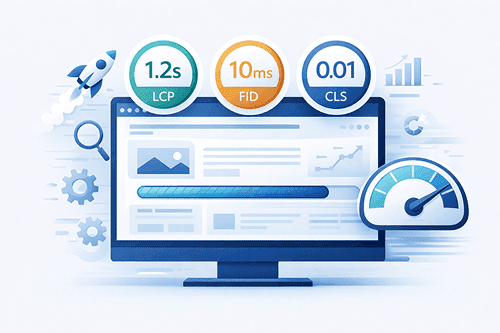
1. Largest content full paint (LCP)
- Measures loading speed.
- Should be under 2.5 seconds.
- Affected by images, hosting server speed.
2. First input delay (FID)
- Measures interactivity.
- How fast the site responds to clicks.
3. Cumulative layout shift (CLS)
- Measures visual stability.
- Prevents buttons and content from jumping.
Improving these metrics is a fundamental part of any website performance optimization.
Website performance metrics you should track
You don’t need to be a technical expert, just take note of the following data.
- Page load time.
- Time to first byte (TTFB).
- Core web vitals scores.
- Mobile performance.
- Bounce rate.
Tools like Google page speed insight and GTmatrix make this easy.
Practical website performance best practices
The following website optimization techniques works best.
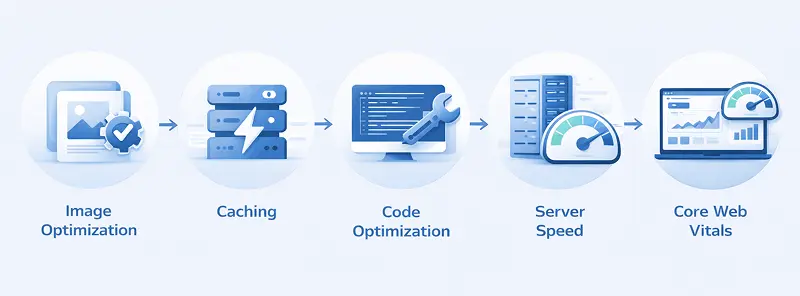
1. Optimize images
- Use compressed images (webp format)
- Upload appropriate size images.
- Use lazy load for images.
This will reduce website load time by 30 to 50%.
2. Choose fast, reliable hosting
Cheap hosting will not work if you want to grow your website fast.
Look for :
- SSD or NVMe storage.
- Good server response time.
- Proper caching.
Hosting has a direct impact on website speed and performance.
3. Enable caching
Caching stores a ready version of your site, so it loads faster for repeat visitors.
Benefits :
- Faster loading pages.
- Less server load.
- Better user experience.
Vital for page speed optimization.
4 Minimize CSS and JavaScript.
Too many scripts slow down your site.
Best practices :
- Remove unused plugins.
- Combine files where possible.
- Load scripts only when needed.
This improves both speed and stability.
5 Mobile Optimization is not optional
More than 60% traffic comes from mobile.
Make sure :
- Design is responsive.
- Fonts are readable.
- Buttons are easy to tap.
- Mobile load time is less.
It is a very essential factor for Google ranking.
Real world business Scenario
A small business website looks great but lead collection is less.
Problems :
- Home page load time 6.2 seconds.
- High bounce rate.
- Low enquiry rate.
Solutions :
- Image Compression.
- Better hosting.
- Caching enabled.
- Core web vitals optimized.
Results :
- Load time 2.3 seconds.
- Bounce rate reduced by 38%.
- Lead form submissions doubled.
This is the power of website performance optimization.
Common website performance improvement techniques
- Use only necessary plugins.
- Use light weight UI elements.
- Optimize for mobile first experience.
- Audit your site every 3 to 6 months.
How website performance improves conversion and UX.
Benefits include :
- Better first Impressions.
- Higher trust.
- Lower bounce rate.
- More form submissions.
- Higher sales.
Website performance optimization for SEO
Performance affects :
- Crawl budget.
- Indexing speed.
- Rankings.
- User engagement.
SEO is not just content and back-links anymore. Speed is also a part of SEO. If your competitors have faster websites then they will have an edge.
Conclusion :
Website performance optimization is one of the most important factor a developer must focus on. It is about creating a better experience for users and search engines.
A faster website :
- Ranks higher.
- Converts better.
- Builds trust.
- Supports long term growth.
If your website is part of your business, then performance cannot be compromised.
Frequently Asked Questions
1. What is website performance optimization ?
It is about improving website speed, stability and responsiveness to enhance user experience and SEO rankings.
2. How does website speed affect SEO ?
Google uses speed and core web vitals as ranking factors. Faster websites rank higher and retains users for long.
3. What is a good website load time?
Usually a website page should load within 3 seconds. Faster is always better.
4. Do small business websites really need performance optimization?
Yes. Speed creates better first impression, trust, leads and conversions regardless of your business size.
5. How often should I check website performance?
Good practice is every 3 to 6 months, or after major updates.